

Boca Raton AdWords Campaign Manager Services by UltraWeb Marketing
Why Managing Multiple Ad Accounts Doesn’t Have to Be Overwhelming
An AdWords campaign manager (officially Google Ads Manager Account) is a central platform for controlling multiple Google Ads accounts from one dashboard. It eliminates constant logins and provides consolidated reporting and billing. For local businesses seeking Web Design Boca Raton and stronger lead generation, pairing a high-performing website with expert Google Ads management is the fastest path to consistent results.
If you’re searching for a Web Designer Near Me or even a Web Designer Deerfield Beach to modernize your site before scaling ads, UltraWeb Marketing unifies web design, SEO, and Google Ads into a ROI-focused plan.
Request a free consultation to see how we can streamline your ads and website for growth.
Quick Answer: What is a Google Ads Manager Account?
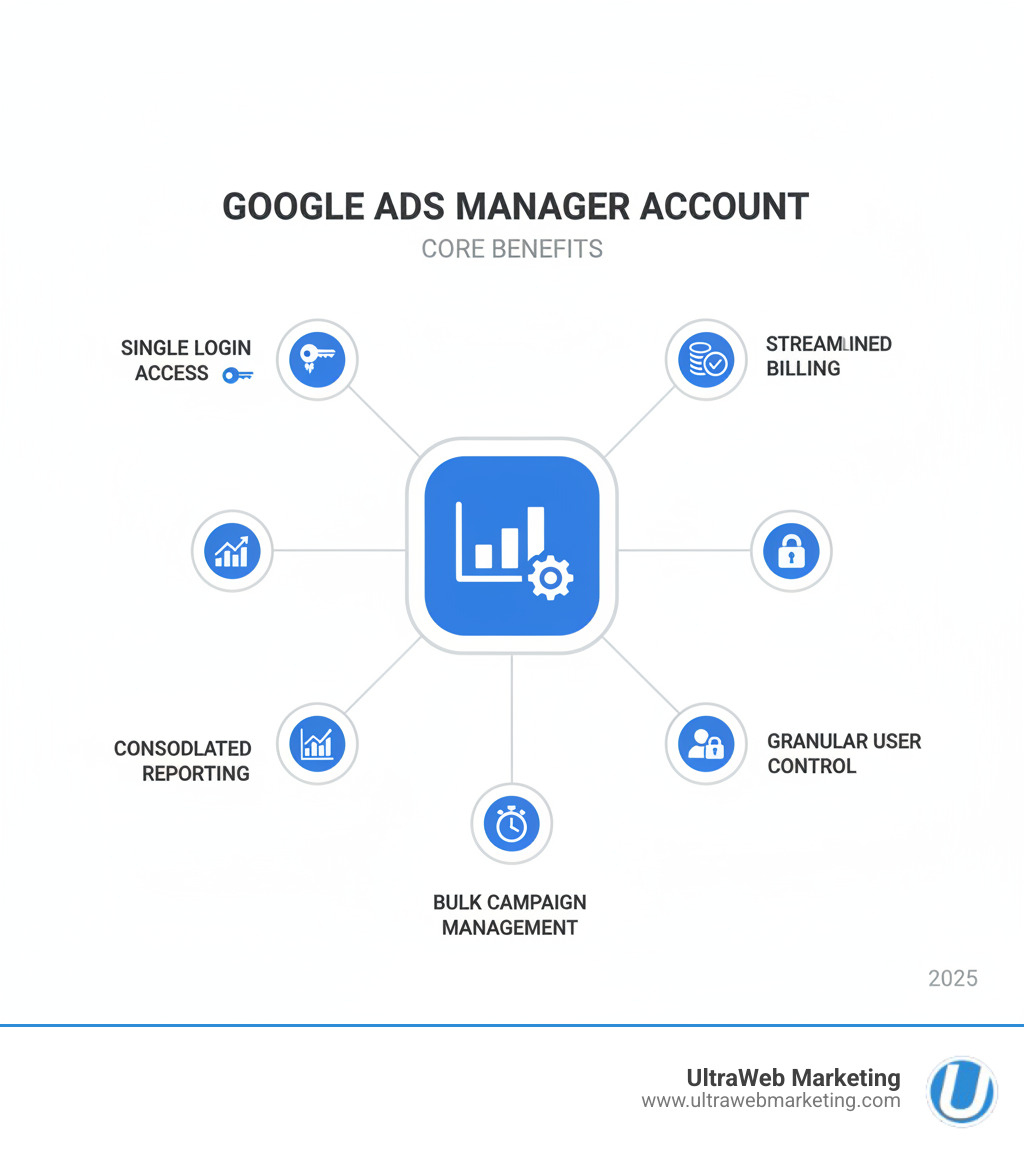
- Single Sign-On: Access all your Google Ads accounts with one login
- Centralized Control: Create, edit, and monitor campaigns across multiple accounts from one place
- Consolidated Reporting: Compare performance and generate reports for all accounts at once
- User Access Management: Grant and control team member permissions easily
- Simplified Billing: Consolidate invoicing with monthly billing options
- Ideal For: Digital agencies, businesses with multiple accounts, franchise owners, and large advertisers
If you manage more than one Google Ads account, you know the frustration of logging in and out, hunting for data, and wrestling with separate reports. This process is time-consuming and hurts your ability to make quick, informed decisions.
Fortunately, Google built a solution. The Google Ads Manager Account (formerly My Client Center or MCC) acts as a command center, giving you bird’s-eye visibility and granular control over all your advertising from a unified interface.
I’m Damon Delcoro, founder of UltraWeb Marketing in Boca Raton. For over a decade, I’ve used adwords campaign manager tools to scale our business and manage campaigns for dozens of local clients. The efficiency gains are significant, and this guide will show you how to achieve them.
What is a Google Ads Manager Account and Why You Need One
A Google Ads Manager Account solves the common problem of juggling multiple browser tabs for different Google Ads accounts. Formerly known as My Client Center (MCC), this platform brings all your separate advertising accounts under one roof, providing a single dashboard and eliminating the need to log in and out repeatedly.
While it’s a game-changer for digital marketing agencies like UltraWeb Marketing in Boca Raton, it’s equally valuable for other businesses. Large advertisers with multiple product lines or locations, such as a restaurant chain with locations in Delray Beach and West Palm Beach, can gain oversight of the big picture. Franchise businesses across Parkland or Boynton Beach can manage each location’s unique advertising while maintaining brand consistency.
Even a business owner running ads for different services can simplify their life with a manager account. If you’re searching for a Search Engine Marketing Agency Near Me in the Boca Raton area, any reputable agency should be using a manager account to ensure your campaigns get the attention they deserve.
Key Benefits: Efficiency, Control, and Scale
The benefits of a manager account boil down to three core pillars that transform how you handle advertising.
-
Time Savings: With an AdWords campaign manager dashboard, you log in once to see everything. Adjusting budgets or pausing ads across multiple accounts takes just a few clicks, saving hours each week.
-
Single Dashboard Management: Everything is clearly organized, and you can switch between accounts without logging out. This prevents confusion and accidental changes to the wrong campaign.
-
Simplified Reporting: Instead of pulling separate reports, you can generate consolidated reports that show performance across all your accounts at once, making it easy to see which campaigns are succeeding.
-
Improved Control: Grant different user access levels—Admin, Standard, or Read-only—to team members based on their role. You can update permissions across all accounts instantly.
-
Consolidated Billing: Simplify your accounting by consolidating invoices from multiple accounts into a single monthly bill.
-
Scalability: As your business expands, you can easily add new client accounts or launch new campaigns. At UltraWeb Marketing, we’ve used manager accounts to scale from a handful of local campaigns to overseeing advertising for businesses throughout South Florida. Whether you need a PPC Agency Boca Raton can trust or are handling your own campaigns, this scalability ensures you’re never held back by your tools.
A Google Ads Manager Account provides a unified hub to create campaigns, compare performance, run reports, and set up alerts—all without the headache of constant account switching. It’s essential for anyone serious about managing multiple advertising efforts efficiently.
How to Set Up and Structure Your Manager Account
Setting up your adwords campaign manager account is easier than you might think. This section walks you through the essential steps to get your manager account running, a crucial first step for any business in Boca Raton or South Florida looking to streamline advertising.
Step 1: Creating Your Manager Account
Creating your Google Ads Manager Account is a straightforward process that takes just a few minutes.
Start by visiting the Google Ads manager account homepage. Sign in with the email address you plan to use as your primary login. Choose this carefully, as it will be the key to your entire advertising dashboard.
Next, name your account professionally and recognizably. For agencies like UltraWeb Marketing, we use our company name. A multi-location business might choose something like “ABC Restaurants – Corporate.”
Google will ask about your account purpose—managing your own accounts or those of clients. Finally, set your country, time zone, and currency to ensure consistent reporting. Once you’ve entered these details, create your account and explore your new command center. Google’s help center offers further guidance if needed, such as Google’s official guide to creating a manager account.
Step 2: Linking and Organizing Your Ad Accounts
With your manager account created, it’s time to bring your existing Google Ads accounts into the fold or create new ones.
Linking existing accounts is a two-step process. From your adwords campaign manager account, go to “Sub-account settings” and send a link request to the individual Google Ads account. The owner of that account must then accept your request from within their own Google Ads interface. This security measure ensures no one can take over an account without permission. For details, see Google’s documentation on linking accounts to your manager account.
If you’re starting fresh, you can create new Google Ads accounts directly from your manager dashboard, which is incredibly convenient. If you encounter any issues, Google’s own documentation provides detailed instructions for linking accounts.
Once linked, organization is key. Use labels to categorize accounts by industry, location, or performance tier (e.g., “Boca Raton Medical Clients,” “High-Priority Accounts”). This makes filtering and analysis incredibly fast.
Equally important are consistent naming conventions for accounts and campaigns. A clear system like “FTLClientNameSearch_Brand” saves enormous time and prevents costly mistakes when viewing reports or making bulk changes. Investing a few minutes in organization now saves hours of frustration later. A clear structure is what separates smooth operations from chaos.
Core Functions of an AdWords Campaign Manager
Your AdWords campaign manager account’s dashboard is your command center, allowing for efficient management across all linked accounts. This is where the power of consolidation comes to life.
Centralized Campaign Creation and Editing
One of the most powerful features is creating and modifying campaigns across all linked accounts from a single interface. No more logging in and out or wondering which account you’re viewing.

From the “Campaigns” page, you can create campaigns for any account you manage. Simply select the desired account and proceed as you would in an individual account. This allows us to quickly roll out new strategies for our clients in Boca Raton, Parkland, or West Palm Beach without jumping between logins. For feature specifics, see Google’s guide to creating and managing campaigns from a manager account.
Need to pause all campaigns for a client or adjust budgets? Select the relevant campaigns, click “Edit,” and apply the changes. You can even preview changes before committing, which is a helpful safety net. These centralized features dramatically speed up campaign management.
Consolidated Reporting and Performance Analysis
An AdWords campaign manager shines when giving you a bird’s-eye view of performance. Instead of piecing together data from different accounts, you get everything in one place.
View the full range of Google Ads performance data for all client campaigns—impressions, clicks, conversions, and costs—on a single screen. The dashboard allows for easy side-by-side comparison of different campaigns or entire accounts, which is invaluable for identifying top performers.
Generating cross-account reports becomes a breeze. Manager accounts let us create comprehensive reports covering multiple accounts at once, simplifying client reporting for our clients in Boca Raton and throughout South Florida. We can also track conversions at the manager level for a unified view of success.
For clients in different currencies, the “Converted Currency” layer converts all cost data into your manager account’s primary currency, making financial analysis clear and consistent. For more insights into our process, check out our Search Marketing Boca Raton page.
Advanced Customization with Filters and Labels
When managing many campaigns, you need tools to cut through the noise. The filter function helps you zero in on specific segments of your advertising efforts, such as all active campaigns for Delray Beach clients. If you have over 500 accounts, you’ll need to filter your view by selecting specific accounts first.
Segments allow for even deeper analysis, breaking down data by device, day of the week, conversion action, and more. These insights enable us to optimize strategies for maximum impact.
Labels remain your organizational superpower, allowing you to quickly filter your view to see only campaigns with specific labels, whether by client type, location, or performance tier.
While the dashboard is powerful, some granular functions, like using the copy-and-paste feature or managing certain bid strategies, require navigating to the individual client account. The manager account provides oversight and bulk actions, while individual accounts allow for deep, granular optimization.
Best Practices for Advanced Management
Taking your management to the next level involves leveraging automation, securing your accounts, and implementing expert strategies. For an AdWords campaign manager, these advanced tactics are what separate good management from great management—and they’re what allow agencies like UltraWeb Marketing to deliver exceptional results for our Boca Raton and South Florida clients.
Leveraging Automation and AI for Optimization
An AdWords campaign manager account puts Google’s AI-powered capabilities at your fingertips across all managed accounts. Think of AI as your tireless assistant, working around the clock to optimize campaigns.
Automated rules are a powerful time-saving feature. We can set up rules to perform actions based on predefined conditions, such as pausing ads with a low click-through rate or increasing bids on high-converting keywords. These rules act as guardrails, keeping campaigns on track without constant manual intervention.
The Recommendations tab is where Google’s machine learning provides AI-driven suggestions to improve performance. From the manager account, we can review and apply these recommendations across multiple accounts simultaneously, ensuring all clients benefit from Google’s latest insights.
For Performance Max campaigns, the Insights Page provides deep analysis of performance trends, audience insights, and ad asset performance. This helps us understand not just what’s working, but why. These AI-powered solutions help find new customers, build effective creative, and identify performance opportunities to multiply business results. Explore more in Google Ads AI Essentials.
Essential Tips for a Professional AdWords Campaign Manager
Effective management involves strategic oversight, attention to detail, and a commitment to security.

Managing user access and security is a top priority. From the manager dashboard, we grant different access levels—Administrative, Standard, or Read-only—to ensure only authorized personnel can make changes. Security requires ongoing attention. We regularly audit user permissions, especially as teams evolve, to prevent unauthorized access. The manager account simplifies this review process.
Setting up alerts for important account changes is like a smoke detector for your campaigns. Custom alerts notify us of critical events like unusual spending or a drop in conversions, allowing us to address issues before they become major problems. For our clients in Boca Raton and Delray Beach, this means we’re catching and fixing issues proactively.
Finally, maintaining a clear and logical account structure is essential. Consistent naming conventions and strategic use of labels simplify navigation, make reporting painless, and dramatically reduce troubleshooting time.
For agencies like UltraWeb Marketing, manager accounts are transformative. We provide consolidated billing, streamlined reports, and centralized access management. This professional oversight is nearly impossible for individual advertisers to replicate, which is why businesses throughout South Florida partner with us. With our custom digital marketing plans starting as low as $279/month, you get expert management without the overhead of an in-house team.
Frequently Asked Questions about Google Ads Manager Accounts
We’ve managed Google Ads accounts for clients across South Florida for over a decade and often hear the same questions. Here are answers to the most common queries about AdWords campaign manager accounts.
What’s the difference between a manager account and a standard Google Ads account?
A standard Google Ads account is for a single business to manage its own campaigns. A Google Ads Manager Account (or MCC) is an “umbrella” account that lets you access and manage multiple standard accounts from a single dashboard. It’s designed for oversight and efficiency, providing tools for consolidated reporting, billing, and user management that a standard account lacks.
Can I use one email for multiple Google Ads accounts without a manager account?
While you can associate one Google Account with up to 20 individual Google Ads accounts, this is not the recommended or efficient method. Without a manager account, you must still switch between accounts individually, which is tedious and prone to errors. A Google Ads Manager Account provides a centralized dashboard and tools specifically designed for multi-account management, making it the essential choice for anyone managing more than a few accounts.
What are the main limitations of the manager account’s ‘Campaigns’ page?
The manager account’s ‘Campaigns’ page is powerful for oversight and bulk actions, but it doesn’t completely replace the need to work within individual accounts. Some granular functions are only available at the individual account level, such as using the copy-and-paste feature in the “Edit” menu or managing certain advanced bid strategies.
Think of it this way: the AdWords campaign manager account is your command center for strategy and bulk actions, while the individual accounts are where you execute detailed, tactical optimizations. Together, they provide complete control at every level.
Let the Experts Manage Your Campaigns
Mastering the Google Ads platform and the AdWords campaign manager tool requires time, expertise, and continuous learning. While these tools provide incredible power, their complexity can be a significant hurdle for busy business owners. For companies in Boca Raton, Delray Beach, and across South Florida, focusing on your core business operations is paramount—you shouldn’t have to become a Google Ads expert on top of everything else.
That’s exactly where UltraWeb Marketing comes in. Our team of certified Google Ads Management experts lives and breathes campaign optimization. We’ve spent over a decade perfecting our craft, managing everything from small local campaigns to multi-account operations generating millions in revenue. We handle the entire process—from initial account setup and strategic campaign creation to daily monitoring, bid adjustments, and advanced reporting—ensuring your ad spend delivers maximum ROI.
We pride ourselves on fast response times and exceptional customer service. When you work with UltraWeb, you get a dedicated team that truly cares about your success. We don’t just set up campaigns and disappear; we actively manage, optimize, and communicate with you every step of the way.
With our custom digital marketing plans starting as low as $279/month, professional Google Ads management is more accessible than you might think. Whether you’re a single-location business in Boca Raton or a multi-location franchise spanning Fort Lauderdale to West Palm Beach, we have the tools and expertise to streamline your advertising operations. If you also need a partner for website upgrades or a Web Designer Deerfield Beach to modernize your site, our web design and SEO team ensures your ads drive traffic to a fast, conversion-ready website.
Don’t let the complexities of Google Ads management drain your valuable time. Contact UltraWeb Marketing today for a free consultation and let us simplify your ad operations, helping your business rank on Google and attract more customers throughout South Florida. We’ll handle the technical details while you focus on what you do best—running your business.
Request your quote now and see why UltraWeb Marketing is the top choice for Web Design Boca Raton, SEO, and Google Ads.